What Is an OBD-II Port? (And Why Every Business Owner With a Fleet Should Know)
It's in every vehicle you own. It takes 60 seconds to use. And it's the reason GPS tracking doesn't require a mechanic.

If you've ever looked into GPS fleet tracking and seen the phrase "plug-and-play OBD-II installation," you probably did one of two things: nodded like you knew what that meant, or quietly moved on without asking.
You're not alone. Most small business owners have never heard of an OBD-II port — even though every vehicle in their fleet has one, and has had one for decades.
Here's everything you need to know. No technical background required.
What OBD-II Actually Stands For
OBD stands for On-Board Diagnostics. The "II" just means it's the second generation of the standard — the version that became universal in the mid-1990s.
In plain English: it's a built-in diagnostic system that every modern vehicle has. It monitors your engine, emissions, fuel system, and dozens of other components in real time — and it stores that data in a port that anyone can access.
You've actually interacted with this system before, even if you didn't know it. When your check engine light comes on and you take the vehicle to a mechanic, the first thing they do is plug a scanner into the OBD-II port to read the error codes. That's how they know what's wrong without taking the engine apart.
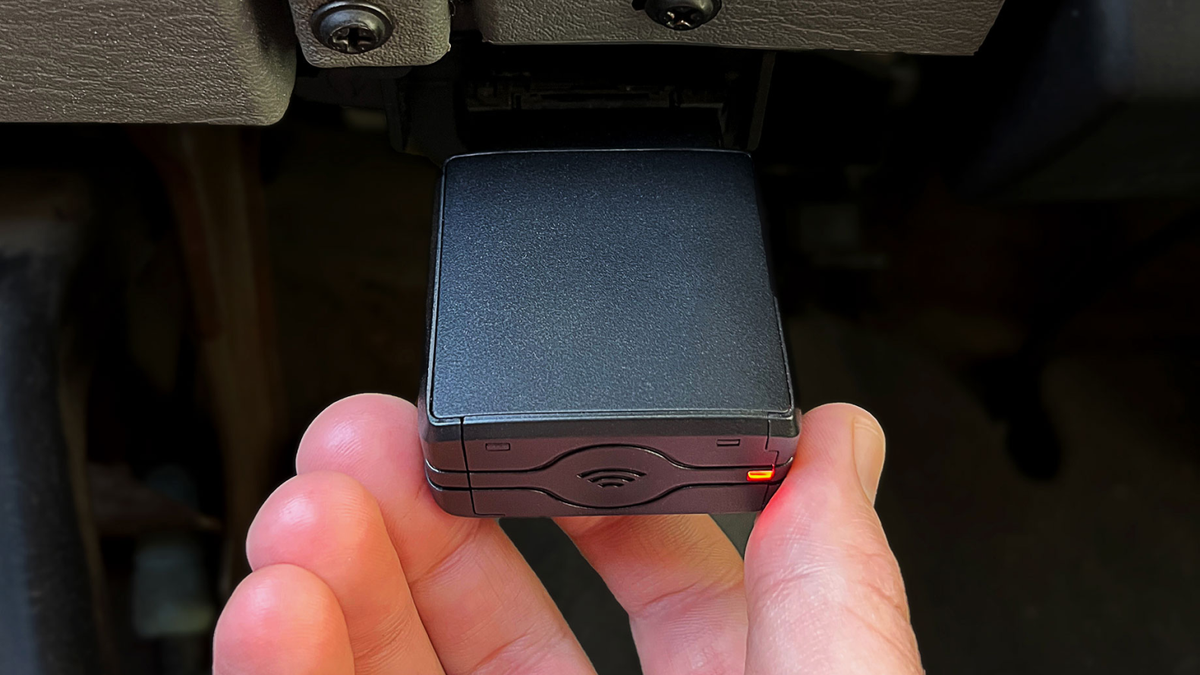
The same port that your mechanic uses is the same port a GPS fleet tracker plugs into.
Where Is It Located?
In virtually every vehicle made after 1996, the OBD-II port is located under the dashboard on the driver's side — usually within a foot or two of the steering wheel.
It's a small, trapezoid-shaped 16-pin connector. You don't need to remove any panels or use any tools to access it. In most vehicles, you can find it by simply reaching under the dash and feeling around — it's usually right there.
Some vehicles — particularly certain Ford Transit vans and a handful of other commercial vehicles — have the port in a slightly different location, like inside the center console or behind a small panel. But it's always accessible without tools.
What Does It Actually Do?
The OBD-II system is constantly collecting data from your vehicle's sensors. Depending on the vehicle's age and make, this can include:
- Engine status — running, off, or idling
- Vehicle speed — real-time and trip-level
- Fuel level — how much fuel is in the tank
- Fuel consumption — how much fuel is being used per trip
- Engine RPM — how hard the engine is working
- Diagnostic trouble codes (DTCs) — the codes behind your check engine light
- Battery voltage — health of the vehicle's battery
- Odometer data — total mileage on the vehicle (on most vehicles 2008 and newer)
When a GPS fleet tracker is plugged into this port, it reads this data continuously and sends it to the cloud — where you can see it in an app on your phone or a dashboard on your computer.
That's the whole system. No cameras. No complicated wiring. Just a small device reading data that your vehicle is already generating.
Which Vehicles Have an OBD-II Port?
Almost certainly all of them.
In the United States, OBD-II has been mandatory on all passenger cars and light-duty trucks since 1996. That means any vehicle in your fleet made in the last 30 years almost certainly has one.
This includes:
- Gas-powered vehicles — full support for all features
- Hybrid vehicles — full support for all features
- Electric vehicles — full support for all features
- Heavier duty trucks — OBD-II port is present, though some fuel tracking features may require an adapter depending on the vehicle
The only vehicles that might not have a standard OBD-II port are older commercial trucks or specialty vehicles — and even then, adapters are usually available.
What a GPS Tracker Reads From the OBD-II Port
When the Fleet Tracker from Fleet Aware is plugged into your vehicle's OBD-II port, here's exactly what it reads and reports back to you:
Location data — GPS coordinates updated in real time, every 5 seconds, shown as a live map with estimated street addresses.
Trip history — every trip automatically recorded with start address, end address, duration, distance, and route taken.
Engine status — whether the vehicle is running, off, or idling — updated in real time.
Fuel level — current fuel level visible in the app at a glance.
Fuel consumption — average miles per gallon per trip and across your whole fleet in aggregate.
Driver behavior — speeding, hard braking, and rapid acceleration detected through speed and engine data.
Idling time — how long the engine has been running without the vehicle moving, tracked per trip and per day.
Battery health — low battery alerts so you're not caught off guard by a vehicle that won't start.
Engine fault codes — if a check engine light comes on, you'll see the diagnostic code in the app before your driver even tells you about it.
All of that from one small device. Plugged into a port that's already in your vehicle.
How Long Does Installation Actually Take?
This is the part that surprises most business owners.
There is no installation in the traditional sense. You don't schedule a mechanic. You don't take the vehicle off the road. You don't need tools, zip ties, or a wiring diagram.
You find the port under the dashboard. You plug in the Fleet Tracker. You're done.
The whole process takes about 60 seconds per vehicle.
Most business owners set up their entire fleet before they finish their morning coffee.
What About the Check Engine Light?
This is one of the most common questions business owners ask — and it's a fair one.
Plugging a GPS tracker into the OBD-II port does not trigger the check engine light. The device reads data passively — it doesn't write to the vehicle's computer or change any settings. It's the same as plugging a phone charger into a USB port. The vehicle doesn't know or care that it's there.
In fact, the opposite is true: if a check engine light does come on, Fleet Aware will show you the diagnostic trouble code in the app — so you know what the issue is before you even call the mechanic. That's one less thing to wonder about.
What Happens If the Tracker Gets Unplugged?
Good question — and one worth knowing the answer to.
If the Fleet Tracker is unplugged from the OBD-II port, Fleet Aware sends you an immediate alert.
You'll know within seconds that a device has been disconnected — which vehicle it was, and when it happened. This protects you from drivers who might try to unplug the tracker to avoid being tracked, and it gives you a clear record of any tampering.
Why This Matters for Your Business
Understanding the OBD-II port matters for one simple reason: it removes the last excuse for not having GPS tracking on your fleet.
There's no complicated installation. No mechanic appointment. No downtime. No tools. No technical knowledge required.
Every vehicle you own already has the port. The Fleet Tracker ships to your door, plugs in in 60 seconds, and your vehicle is tracked instantly.
At $15/month per vehicle with no long-term contract, the barrier to getting started has never been lower. See exactly how it works →
The Bottom Line
The OBD-II port is one of the most useful things in your vehicles — and most business owners have never thought about it once.
It's already there. It already collects data. All you need is a device that reads it and puts that data in front of you in a way that's actually useful.
That's exactly what Fleet Aware does.
One port. One plug. Total fleet visibility.
👉 Get started with Fleet Aware →
Questions? Chat with us or call (855) 712-9273. No pressure, no demo required.