How to Prove Your Driver Showed Up (And Why It Matters More Than You Think)
One customer dispute can cost you a refund, a bad review, or a client you've had for years. Here's how to protect yourself with facts.


It happens to almost every service business at some point.
You send a technician out. The job gets done — or at least your driver says it did. Then the phone rings. The customer is upset. They're saying your guy never showed up, showed up late, or left after five minutes. Maybe they want a refund. Maybe they're threatening a bad review. Maybe they're just genuinely confused about what happened.
And you're stuck in the middle with nothing but your driver's word against theirs.
This is one of the most frustrating situations a small business owner can face — not because it happens constantly, but because when it does happen, you have no way to resolve it quickly or confidently without proof.
Until now.
The Problem With "He Said, She Said"
When a customer dispute comes in and you don't have data, you have exactly two options:
Option 1: Take your driver's word for it and push back on the customer. This risks damaging a client relationship, potentially losing the account, and leaving the customer feeling dismissed.
Option 2: Give the customer the benefit of the doubt, issue a refund or a free return visit, and absorb the cost. This protects the relationship but punishes your business — and your driver — for something that may not have even happened.
Neither option feels good. And neither one is based on facts.
The real problem isn't the dispute itself — it's that you don't have the information to resolve it fairly.
What GPS Trip History Actually Shows You
This is one of the most underappreciated features of GPS vehicle tracking, and it's genuinely one of the most useful things you can have as a service business owner.
Every trip your vehicle takes is recorded automatically. Not just a dot on a map — a full, detailed record that includes:
- Exact start address and time — where the vehicle left from and when
- Exact end address and time — where the vehicle arrived and when
- Total trip duration — how long the vehicle was in motion
- Time parked at the destination — how long the vehicle sat at that address before moving again
- The route taken — visible on a map, showing every turn and every road
- Driver behavior during the trip — speeding, hard braking, any alerts that occurred
That's not a rough estimate. That's a timestamped, GPS-verified record of exactly what happened.
A Real Scenario: Dispute Resolved in 90 Seconds
Let's say a customer calls on a Friday afternoon claiming your HVAC technician never showed up for a scheduled appointment at 10 AM.
Without GPS tracking, you call your driver. He says he was there. You call the customer back. They say he wasn't. You're going in circles.
With Fleet Aware, here's what happens instead:
You open the app or the web dashboard. You pull up that vehicle's trip history for that morning. You can see:
- The vehicle arrived at the customer's address at 9:58 AM
- It was parked there for 1 hour and 12 minutes
- It departed at 11:10 AM
You call the customer back. You tell them calmly and confidently that your records show the vehicle arrived at their address at 9:58 AM and was on site for over an hour. You can offer to send them a screenshot if needed.
Most of the time, that's the end of the conversation.
It Works the Other Way Too
Here's the part that surprises some business owners: the data doesn't always side with your driver.
Sometimes you pull up the trip history and you find out the vehicle wasn't at the customer's address at the scheduled time. Maybe your driver made a personal stop first and arrived 45 minutes late. Maybe they left after 20 minutes when the job should have taken an hour.
That's uncomfortable — but it's information you need.
Knowing the truth, even when it's not what you hoped, lets you:
- Make it right with the customer — quickly and genuinely, not defensively
- Have a real conversation with your driver — based on facts, not accusations
- Prevent it from happening again — because now your driver knows the record exists
The goal isn't to catch people doing something wrong. The goal is to run a business where the truth is always accessible.
Geofences: Getting Notified Automatically
Beyond trip history, Fleet Aware also supports Smart Geofences — virtual boundaries you can draw around any address or area on the map.
Here's how service businesses use them:
Job site arrival notifications. Set a geofence around a customer's address. The moment your vehicle enters that area, you get a notification. You know your driver arrived — without calling anyone.
Departure alerts. Get notified when a vehicle leaves a job site. If a job is supposed to take two hours and your driver leaves after 30 minutes, you know immediately.
After-hours alerts. Set a geofence around your home base. If a vehicle leaves the yard outside of business hours, you get an alert. Unauthorized vehicle use — caught automatically.
Geofences turn reactive management into proactive management. Instead of finding out something went wrong after a customer calls, you know what's happening as it happens.
The Customer Experience Angle
There's a softer benefit here that's easy to overlook: GPS tracking makes you look more professional.
When a customer calls with a concern and you can respond within minutes with precise, accurate information — arrival time, duration on site, departure time — it signals that you run a tight operation. You're not scrambling. You're not guessing. You have systems.
That kind of confidence builds trust. And trust is what turns a one-time customer into a long-term client.
Some business owners even mention their tracking system proactively to customers:
"We track all of our vehicles in real time, so if you ever have a question about arrival times or service duration, we can pull that up for you immediately."
That's a selling point. Not just a back-office tool.
How Fleet Aware Makes This Easy
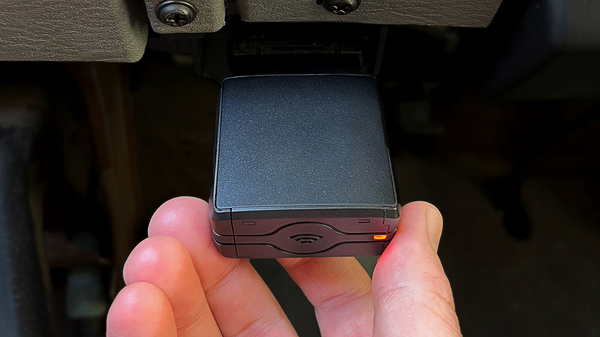
The Fleet Tracker from Fleet Aware records every trip automatically from the moment it's plugged in. There's nothing to configure, no button to press, no log to fill out. It just works.
Here's what you get for dispute resolution and proof of service:
- Full trip history for every vehicle, every day — accessible anytime from your phone or computer
- Start and end addresses with timestamps on every trip
- Time parked at each location — so you know not just that they arrived, but how long they stayed
- Smart Geofences with arrival and departure notifications — customizable per location
- Exportable trip data — filter by vehicle and date range, export to CSV if you ever need a formal record
All of this is included in the standard subscription — no add-ons, no extra fees. At $15/month per vehicle with no long-term contract, it's one of the most cost-effective ways to protect your business from disputes that can cost far more than that in a single afternoon.
The Bottom Line
Customer disputes are part of running a service business. You can't prevent every misunderstanding — but you can make sure you always have the facts when one comes up.
GPS trip history turns a stressful, he-said-she-said situation into a 90-second conversation. And geofences mean you often know what happened before the customer even calls.
Protect your business. Know the truth. Resolve disputes with facts, not guesses.
Questions? Chat with us or call (855) 712-9273. No pressure, no demo required.